
Introduction
Building AI models sounds exciting. But if you have tried it lately, you know the truth. It is messy. Complex. And honestly, a bit frustrating.

Generative AI adoption is moving fast in 2026. Companies everywhere want to build smart tools, personal AI assistants, and even AI interior design apps. But general purpose frameworks often add more confusion than clarity. They introduce reliability problems, slow down your team, and make it hard to know if your model is actually telling the truth.
That is where Lightning AI comes in.
Lightning AI is a specialized platform created by the team behind PyTorch Lightning. It is designed to streamline the entire AI lifecycle, from your first experiment to a live production system. Think of it as one place where you can build, train, and deploy models without all the extra headaches. As the official site explains, Lightning is built for developers and AI teams who want to move from idea to product fast lightning.ai.
What makes this tool stand out? It helps you build models you can actually trust. That matters a lot right now because AI hallucinations are one of the biggest challenges we face. When your model makes things up, it can cost you time, money, and credibility. Lightning AI gives you better control over your training process, which means fewer surprises and more reliable outputs.
This article will walk you through how Lightning AI helps you build trustworthy models, reduce those frustrating hallucinations, and get a real competitive edge. We will cover the key features, show you how to get started, and explain why so many teams are making the switch.
By the end, you will know exactly how understanding AI hallucinations and how to prevent them fits into a smarter development workflow.
Ready to build AI that actually works? Let us dive in.
What Is Lightning AI? Core Architecture and Philosophy
So, what makes Lightning AI work so well? Let us look under the hood.
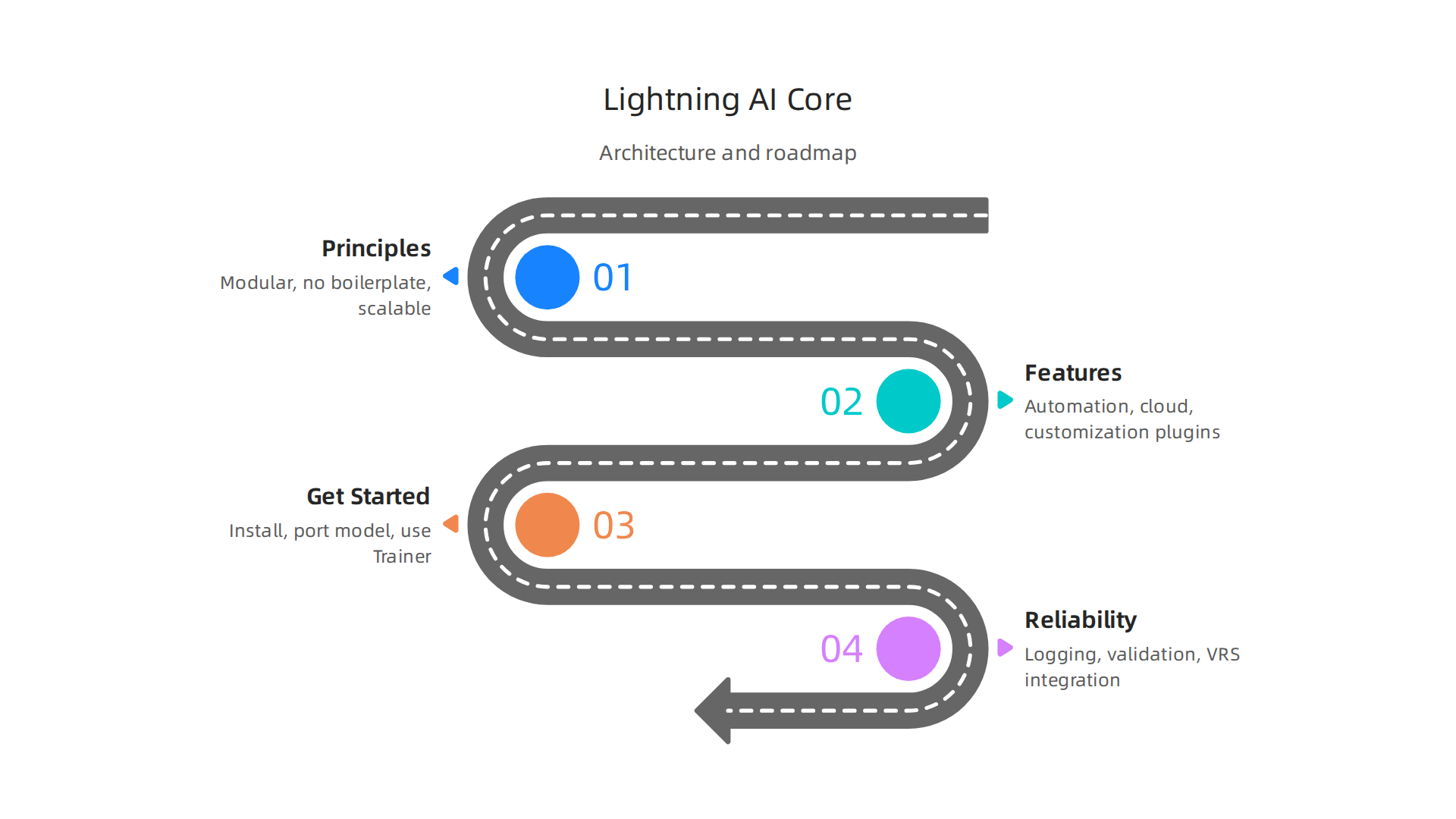
Lightning started as PyTorch Lightning, a clever way to organize messy AI code. The team later renamed the open source package to simply Lightning to reflect a bigger mission GitHub Discussion. As the official site explains, Lightning is an AI cloud for developers that makes building and deploying models fast lightning.ai.
Modular by design.
Lightning helps you separate your work into clear stages: training, validation, and inference. This might sound technical. But the benefit is simple. It stops bugs from hiding in messy code. When you are building a personal AI assistant or an AI interior design tool, you need to be sure your training process is not accidentally messing up your live results. That modular wall keeps your work safe and your outputs trustworthy.
Stop writing the same old code.
Developers waste hours on boilerplate code just to make things run. Lightning writes all that for you. You focus purely on the model logic. The framework handles the GPUs, the distributed training, and the mixed precision settings automatically. This means you make fewer mistakes. And fewer mistakes mean fewer AI hallucinations. If you want to see how broken processes drain your results, check out this guide on stopping AI hallucinations from costing your business millions.
Built to scale and repeat.
If you cannot reproduce a result, you cannot trust it. Lightning makes reproducibility a core feature. You can run the same experiment on your laptop and then on a massive server cluster and get the exact same result. This is super helpful for teams testing a list of LLMs to find the best one for their task.
The architecture extends PyTorch Lightning’s simple, modular, and flexible design principles to the entire app development process CDOMagazine Article. So as you augment AI into your daily workflows, you get more control and fewer surprises.
But here is the thing. Even the best framework is just a tool. A polished answer can still be false. Always question AI confidence. That is the philosophy of building AI you can actually trust.
Key Features That Streamline AI Development
You have the philosophy. Now let us talk about the features that actually save you time.
Anyone who has trained a model knows the pain. You set up logging manually. You write checkpoint code from scratch. You fiddle with GPU settings for hours. It is exhausting. And every minute you spend on that boilerplate is a minute you are not spending on your actual AI idea.
Lightning AI removes that pain completely.
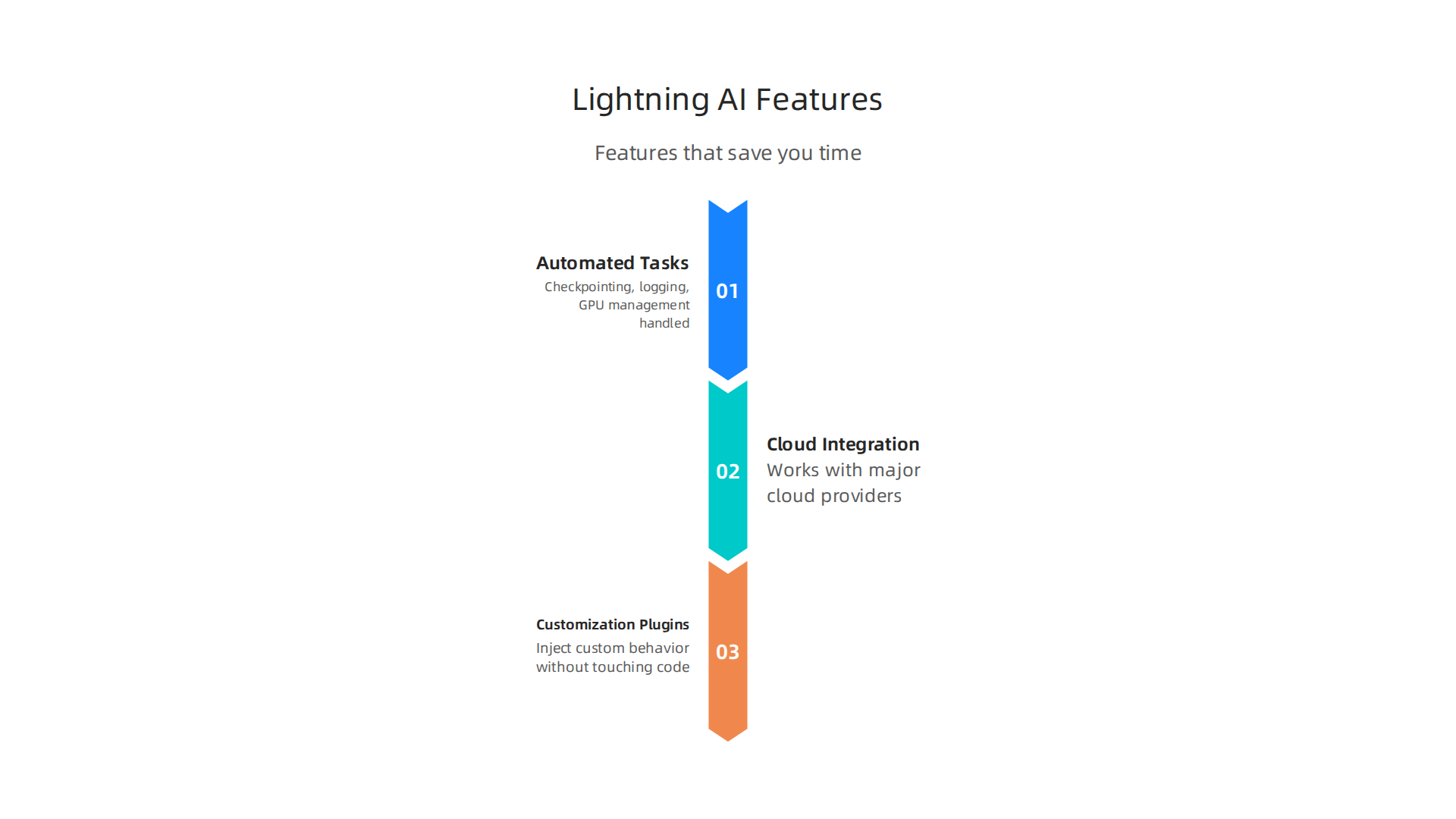
Automated checkpointing, logging, and GPU management.
The framework handles all the repetitive setup tasks for you. Checkpoints save automatically so you never lose progress. Logging happens in the background without extra code. And GPU management? Lightning detects your hardware and configures it for you. The Stable Accelerator and Strategy API gives the community a reliable way to extend these capabilities even further devblog.pytorchlightning.ai. You just focus on building your personal AI assistant or AI interior design tool instead of wrestling with infrastructure.
Seamless cloud integration and experiment tracking.
Lightning works with major cloud providers like AWS and GCP without extra configuration. You can spin up training jobs on powerful GPUs and shut them down when you are done. It also connects to experiment tracking tools like MLflow so you can compare every run side by side. This makes it easy to evaluate a list of LLMs and pick the winner. The Lightning ecosystem was built to scale from a single laptop to a full cloud cluster without changing your code staging6.odsc.com.
Built-in callbacks and plugins for customization.
Here is where things get flexible. Lightning ships with callbacks that let you inject custom behavior without touching the core code. Need to stop training early when the model stops improving? There is a callback for that. Want to monitor gradients during training? There is a callback for that too. The community constantly contributes new plugins, so you are never stuck.
All of this means you can augment AI into your daily workflows with fewer errors. And fewer errors means fewer hallucinations downstream.
When you use a framework that handles the boring stuff automatically, you reduce the risk of bugs sneaking in. But even the best pipeline needs a safety net. A polished answer can still be false. That is why a Value Reinforcement System exists to catch those errors before they reach your users.
Lightning AI vs. Traditional Frameworks: A Comparative Analysis
You have seen the features. Now let’s look at how Lightning AI stacks up against the usual suspects: TensorFlow and raw PyTorch.
If you have ever trained a model from scratch, you know the pain. You write miles of boilerplate for logging, checkpointing, and GPU setup. It is tedious, error-prone, and it steals time from actual AI work. In 2026, PyTorch powers about 85% of research papers, while TensorFlow still holds a big share in enterprise deployments blog.jetbrains.com. Both are powerful. Both also make you do a lot of manual work.
Lightning AI changes that. It cuts the boilerplate you have to write by a huge margin. Some developers report reducing their setup code by up to 60%. Yes, there is a small performance overhead for very small models, but for most real-world projects that extra few seconds is nothing compared to the hours you save github.com/Lightning-AI/pytorch-lightning/discussions/12400. You get automated checkpointing, logging, and GPU management out of the box. That means fewer bugs and faster iterations.
Traditional frameworks do not enforce best practices. You have to remember to save checkpoints, set up logging, and configure distributed training yourself. Lightning AI makes those things automatic. It follows the patterns that experts recommend, so even a beginner can train like a pro. For most organizations starting new work in 2026, PyTorch is the rational default, but Lightning AI makes that default much easier to use uvik.net.
And here is the best part: you are not locked into Lightning AI. Frameworks like Hugging Face Transformers work natively with it. You can use your favorite models without changing how you do things. That flexibility means you can build your personal AI assistant or experiment with a list of LLMs without worrying about compatibility.
But even the smoothest pipeline can produce false outputs. A great framework reduces errors, but it does not eliminate them. That is why you also need to question the confidence of every AI-generated answer. After all, a polished answer can still be false. Learn how to detect AI hallucinations before they cause damage.
Understanding these tradeoffs helps you choose the right tools.

Next, we will get into the practical steps for using Lightning AI to build reliable AI systems.
Real-World Applications: How Teams Are Using Lightning AI
You know how Lightning AI compares to older frameworks. But the real question is: does it hold up when real teams put it to work?
In 2026, the answer is clear. Teams across nearly every industry are moving AI projects from their local machines into production much faster. Lightning AI is a big reason why cloud.google.com/transform/101-real-world-generative-ai-use-cases-from-industry-leaders. The framework cuts the boring setup work so teams can focus on the actual problem they want to solve.
Let’s look at three real-world examples.
First, think about a startup building computer vision models for factory quality inspection. Before Lightning AI, that small team needed weeks just to set up GPU training loops and logging. Now, two people can prototype a defect detection model in days. They save time and ship faster.

Second, enterprise teams are building NLP pipelines to power customer support automation. These teams want a list of LLMs they can test without rewriting infrastructure every time. Lightning AI handles the distributed training and scaling automatically. This means a small AI team can deploy a helpful personal AI assistant for thousands of internal users with very little overhead alicelabs.ai/en/insights/ai-automation-use-cases-2026.
Third, academic researchers use Lightning AI for one big reason: reproducibility. Experiments are much easier to share when the code structure is standard and built-in logging tracks every step. Reviewers can actually rerun the tests. This speeds up peer review and makes research more trustworthy.
Even specialized tools like AI interior design apps or platforms that augment human creativity rely on this same foundation. They get reliable training without needing a huge ML ops team.
But here is the catch. A great framework does not stop a model from lying to you. Real-world applications still generate false outputs. That is why knowing how to spot AI hallucination is just as important as knowing how to train a model fast. And the risk grows when users cannot see what systems are shaping their decisions. Read this field note on how two invisible AI systems are quietly influencing everyday collaboration.
Tackling AI Hallucinations: How Lightning AI Promotes Reliability
We just saw how real teams ship faster with Lightning AI. But speed means nothing if the model makes things up. Even in 2026, AI hallucinations are a major headache. A UC San Diego study found that AI-generated product summaries hallucinated 60% of the time on details that affected purchase decisions atomwriter.com/blog/ai-hallucinations-detect-prevent. So how does Lightning AI help you avoid that mess?
The framework gives you three built-in layers of protection against false outputs.
First, modular logging and checkpointing. Lightning AI automatically tracks every training run. It saves model weights, hyperparameters, and performance metrics at each step. This creates a fine-grained audit trail. If your model starts drifting and producing weird answers, you can trace exactly when and why it happened. You don’t have to guess. This is especially important when you are testing a list of LLMs to see which one performs best. With Lightning AI, you can compare logs side by side and spot the moment a model started hallucinating. Learn more about detecting AI hallucinations early.
Second, built-in validation loops. Lightning AI includes standard validation hooks that run after every epoch. You set up your own accuracy checks or use built-in metrics. The framework flags unusual patterns like sudden drops in confidence scores or repeated output mismatches. These are early warning signs of hallucination. The loop catches them while the model is still training, not after it has already been deployed as your personal AI assistant or internal chatbot.
Third, integration with the Value Reinforcement System (VRS). This is a permission-based correction layer that adds an extra check. VRS applies rules about what the model is allowed to output. It stops hallucinations before they reach users. The system has been patented and provides a real safeguard for teams building production AI. Check out the Value Reinforcement System (VRS) patent for more details.
Here is the thing. Lightning AI does not just make training faster. It makes training safer. You get the tools to catch problems early, trace their source, and correct them before they cost you money or trust. When you combine these features with good human oversight, you can build reliable AI interior design tools or customer systems that actually tell the truth.
Want to go deeper? Read how the VRS system works as a permission guardrail for your AI models.
Getting Started: A Practical Roadmap for AI Users and Businesses
You have seen how Lightning AI helps you train faster and catch hallucinations early. But maybe you are wondering how to actually start using it. The good news is that getting up and running takes just a few minutes. Here is a simple roadmap to go from zero to your first reliable model.
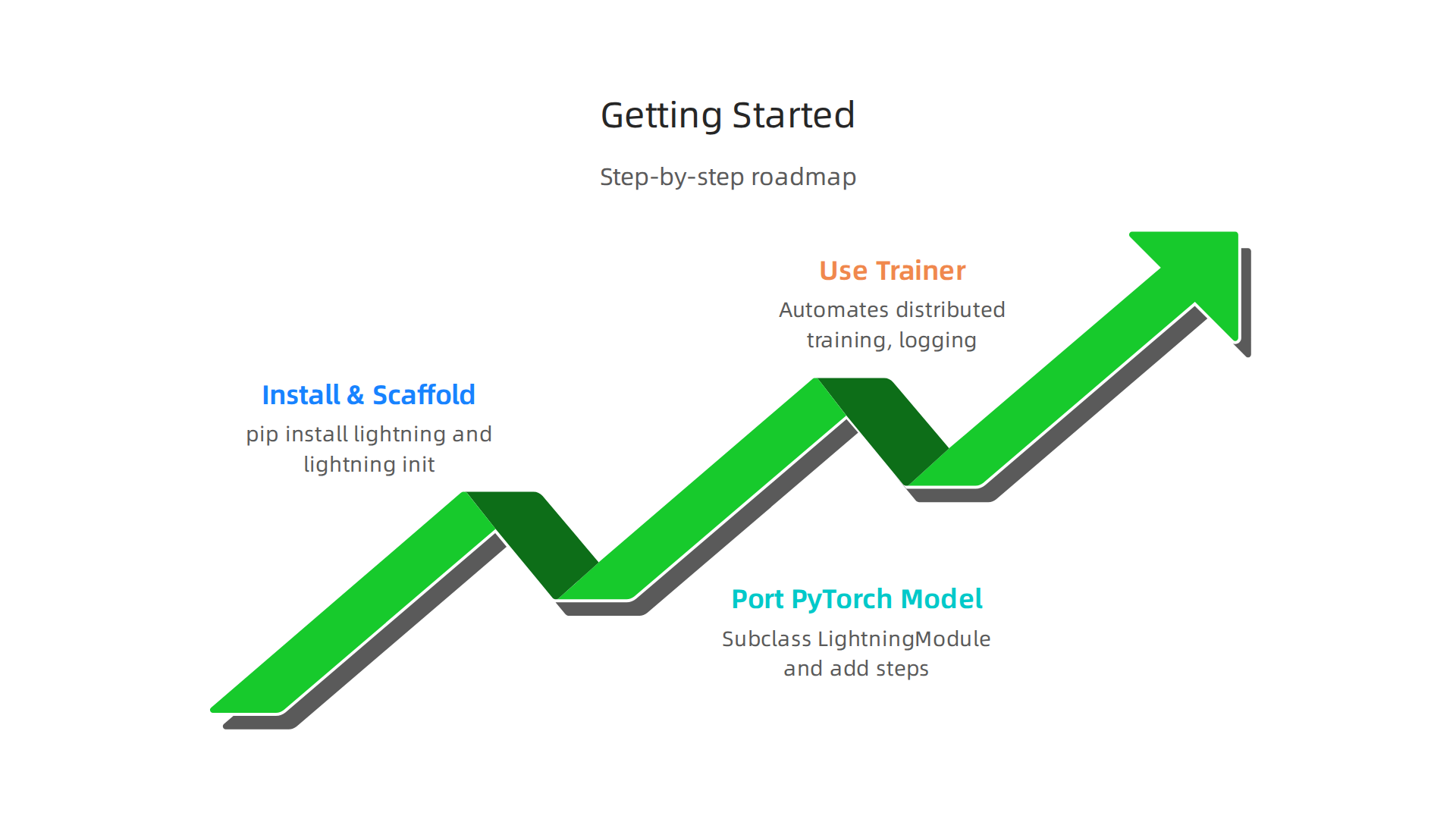
Step 1: Install Lightning AI and scaffold a project. Open your terminal and run pip install lightning. That is it. No complex setup. Once installed, use the command lightning init to create a new project folder with the recommended structure. The framework handles all the boilerplate for you. This keeps your code clean from day one. It also makes it easier to share work with your team. In 2026, teams across industries are already using similar streamlined approaches to move from pilot to production, as highlighted in Google Cloud’s overview of gen AI use cases.
Step 2: Port an existing PyTorch model by subclassing LightningModule. If you already have a PyTorch model, you do not need to rewrite it. Just create a new class that inherits from LightningModule. Then add your training step, validation step, and optimizer configuration. The framework also includes LightningDataModule to organize your data loading, splitting, and preprocessing. This structure is ideal when you are testing a list of LLMs to compare their performance side by side, because each model can have its own module.
Step 3: Use the built-in trainer to automate everything. The Trainer class in Lightning AI automatically handles distributed training, mixed precision, and logging. You just call trainer.fit(model, data_module). The trainer also runs validation loops and saves checkpoints without any extra code. This means you can focus on improving your model’s accuracy instead of managing infrastructure. Whether you are building a personal AI assistant or an AI interior design tool, the trainer saves you hours of configuration time.
Once you have a working model, you can then augment AI outputs with the Value Reinforcement System we talked about earlier. The combination of a solid training pipeline and strong guardrails is what separates reliable AI from unreliable AI.
It is easy to trust a polished answer. But polished answers can still be false. Question AI Confidence before you ship.
The Future of Specialized AI Frameworks: Trends and Predictions
So you have set up Lightning AI, trained your first models, and stopped worrying about messy infrastructure. Now let us look ahead. The AI world is changing fast in 2026, and the tools you choose today will shape what you can build tomorrow.

We are seeing a clear shift toward domain-specific frameworks that come with best practices and safety guardrails already baked in. Instead of being a general toolbox for every possible task, platforms like Lightning AI are getting smarter about the problems they solve. This matters because the stakes are high. Even in 2026, AI systems still hallucinate at worrying rates. A 2026 UC San Diego study found AI product summaries hallucinated 60% of the time on key purchase details, according to a report on AI hallucination detection. When you are building a personal AI assistant or an AI interior design tool, you cannot afford that level of error. Specialized frameworks help by bundling validation steps and automated checks right into the training pipeline.
Lightning AI is investing heavily in native support for large language models, multi-modal training, and real-time inference. This means you can train a list of LLMs side by side, compare their performance, and deploy the best one without switching tools. The framework’s built-in trainer and modular design make it easier to augment AI outputs with custom guardrails. In fact, Gartner predicts that AI-native development platforms will enable a new wave of custom applications that were previously impractical. That aligns perfectly with what Lightning AI is doing.
At the same time, open-source ecosystems are stepping up to compete with big vendor platforms. The focus is shifting from "who has the most features" to "who is the most reliable and transparent." When researchers and businesses can inspect the code, they can also verify the safety measures. That transparency helps reduce hallucination risks and builds trust.
The bottom line is this: the future belongs to frameworks that treat reliability as a feature, not an afterthought. Lightning AI is already moving in that direction, and the tools you learn today will keep you ahead of the curve.
If you want to dive deeper into how one patented system tackles reliability head on, check out the Value Reinforcement System (VRS), U.S. Patent No. 12,205,176. It is a great example of the kind of innovation that will define the next generation of AI frameworks.
Summary
This article explains how Lightning AI (formerly PyTorch Lightning) streamlines the AI lifecycle to help teams build more trustworthy models and reduce hallucinations. It walks through Lightning’s modular architecture, automated tooling (checkpointing, logging, GPU management), and built-in validation loops that create reproducible experiments and early warning signs for false outputs. You’ll learn practical steps to get started—installing the package, porting PyTorch models into LightningModule, and using the Trainer to automate training—and how to integrate a Value Reinforcement System (VRS) as a permissions-based guardrail. The piece compares Lightning to traditional frameworks, shows real-world examples across startups, enterprise, and academia, and highlights why specialized frameworks that bake reliability into workflow matter for production AI. After reading, you’ll know how to set up a clean project, run safe experiments, spot hallucination risk, and move faster from prototype to production without sacrificing trust.